 PUSH & LIFTPUSH & LIFT

Push & Lift · INPUTS CSV, DELTA, DUELO, RADAR, FLAGS and MAP
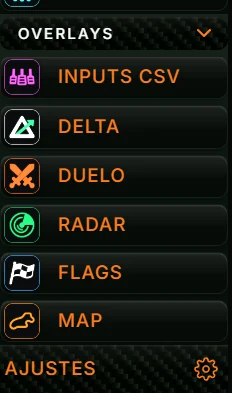
OVERLAYS is the last group in the Push & Lift menu. These separate indicators float above the simulator, each with one task. They work with iRacing and Le Mans Ultimate.
| App | What it shows |
|---|---|
| INPUTS CSV | Throttle, brake and clutch traces, bars, gear, speed and steering wheel. Optionally, the same information from your CSV reference lap appears below. |
| DELTA | Live time gained or lost against a reference lap, plus each sector's time. |
| DUELO | The car ahead, your car and the car behind, with live gaps and whether they are shrinking or growing. |
| RADAR | Cars alongside (blind spot), cars catching you from behind, and slow or stopped cars ahead. |
| FLAGS | The current flag, with its colour and name. |
| MAP | The circuit layout with all cars. |
All six need the Push & Lift engine and an active licence. The engine starts automatically when you enable an overlay.
OVERLAYS also includes overlays you create with TOOLKIT (see 2.6).
This chapter applies to all six. Each app's chapter covers only its specific features.
Selecting an app only shows its screen; it does not turn it on. To display it over the simulator, click ENCENDER (TURN ON). When on, its menu button lights up and its icon appears on the bar.
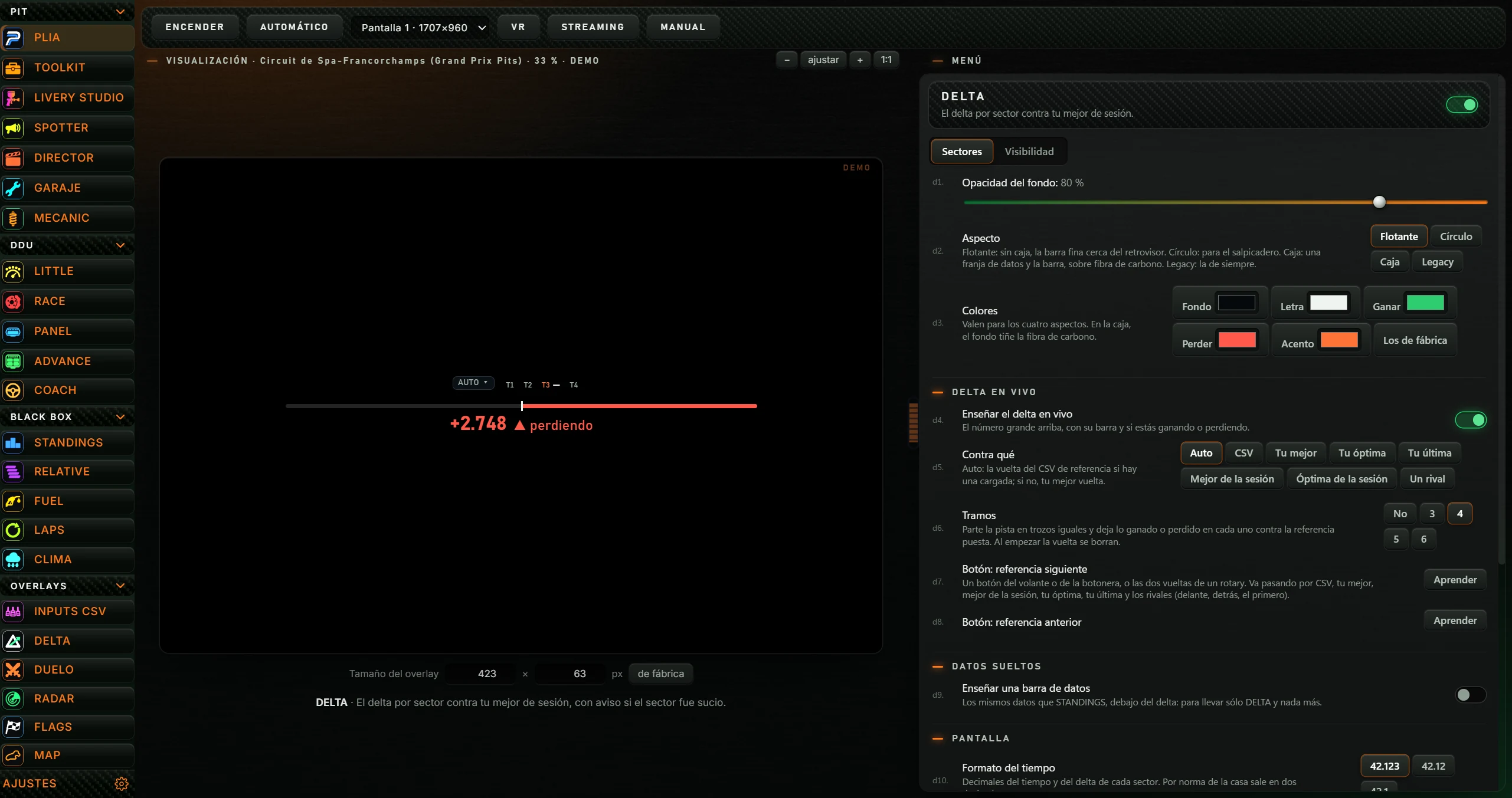
| Button | What it does |
|---|---|
| ENCENDER / APAGAR (TURN OFF) | Turns the overlay on above the simulator or off. When on, the button reads APAGAR. Turning it on puts overlays into edit mode for positioning (see 2.4). |
| AUTOMÁTICO (AUTOMATIC) | When enabled (lit), the overlay starts automatically with iRacing or Le Mans Ultimate and stops when you close the simulator. Click again to disable. |
| Display list | Selects the monitor, for example «Pantalla 1 · 1920×1080». Without a selection, uses the main Windows display. |
| VR | Briefly shows «En OpenKneeboard, captura la ventana «PL OVERLAYS».»: capture the PL OVERLAYS window in OpenKneeboard to see it in VR. |
| STREAMING | Copies the overlay address for OBS and reports it with the browser-source width and height. In OBS, add a browser source, paste the address and set that size. |
| MANUAL | Opens that app's manual on the Push & Lift website in your browser. |

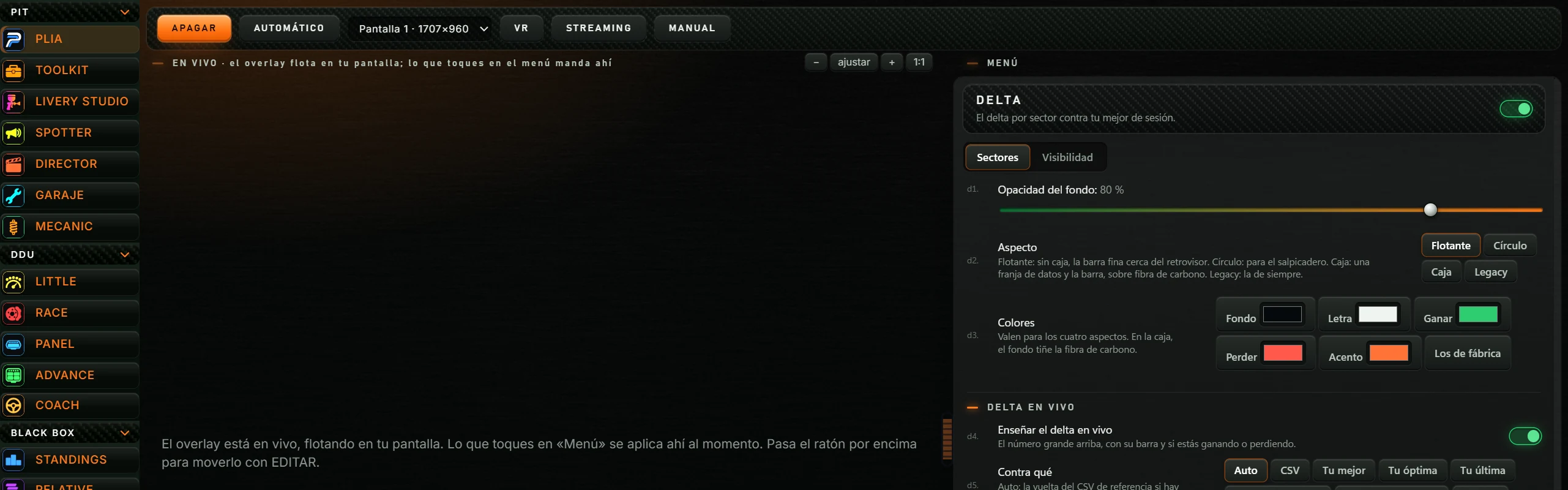
With the overlay on, the preview is replaced by a notice: it is live on your screen, menu changes apply immediately, and hovering lets you move it with EDITAR. The label becomes «EN VIVO · el overlay flota en tu pantalla; lo que toques en el menú manda ahí».
The app's menu is on the right. Changes save automatically and apply immediately, including to the running overlay. Drag the divider between preview and menu to allocate space; double-click to split it equally.
| Component | Meaning |
|---|---|
| Header | App name and description. The green switch on the right hides the overlay drawing without stopping it; turn it back on to see it. |
| Tabs | Below the header. Each app divides its options into two or more tabs. |
| Small numbers | A grey number appears beside each option, for example d1., r5. or s12. Use it to identify the option, for example when talking to PLIA. |
| Switches | Green means on; red means off. |
| Sliders | The selected value appears beside the name. |
| Selection buttons | The selected one has an orange border. |
| Restablecer posición (Reset position) | Centres the running overlay on its screen. Useful if it is out of view. |
| Opacidad del fondo (Background opacity) | Background visibility: 0% transparent, 100% opaque. |
| Visibilidad por sesión (Visibility by session) | One switch per session type: Carrera (Race), Clasificación en solitario (Solo qualifying), Clasificación abierta (Open qualifying), Entrenamientos (Practice) and Test sin conexión (Offline test). When disabled, hides the overlay in that session. Available in all except RADAR. |
| Solo en pista (On track only) | Hides the overlay when you are not in the car (garage, menu, spectator). Available in all except RADAR. |
Running overlays float in a full-screen transparent window called «PL OVERLAYS». By default they are locked: the mouse passes through and clicks reach the simulator.

| What | How |
|---|---|
| Enter edit mode | Hover over the overlay: the orange tab appears just above its top-right corner: EDITAR (EDIT). Click it, or use F6. Enabling an overlay from the Suite enters edit mode automatically. |
| Edit frame | Each overlay has a pulsing orange border and a header with its icon and name. |
| Move | Drag the overlay from any point on its frame. |
| Resize | Drag an orange corner triangle («Arrastra para cambiar el tamaño»). The overlay resizes without distortion. |
| ✓ («Terminar de editar»: finish editing) | Leaves edit mode. F6 does the same. |
| ✕ («Cerrar el overlay»: close overlay) | Turns that overlay off. |
| Right-click | On the edit frame or EDITAR tab: opens the app screen in the Suite. |
Position and size save automatically when you release the mouse.
Change them in AJUSTES, Atajos de teclado (Settings, keyboard shortcuts).
| Default shortcut | Action |
|---|---|
| F6 | Edit overlay positions (enter or leave edit mode). |
| Ctrl+Alt+L | Locks or unlocks overlays. A notice says «OVERLAYS BLOQUEADOS» (clicks pass to simulator; use EDITAR to edit) or «OVERLAYS DESBLOQUEADOS» (you can move them). When unlocked, the mouse no longer passes through and you can click inside, for example DELTA's selector. |
| Alt+H | Shows or hides all overlays. |
| Unassigned | Turns each app on or off (one row per app, including INPUTS CSV, DELTA, DUELO, RADAR, FLAGS and MAP). Enabled with a shortcut, the overlay starts locked without edit mode. |
Create a transparent overlay in TOOLKIT and click AÑADIR A OVERLAYS (ADD TO OVERLAYS): next time you open Push & Lift it appears after MAP in OVERLAYS, as follows:
Shows recent pedal and steering inputs. With a reference lap loaded, shows its inputs below at the same track position, with now in the middle to reveal what comes next.
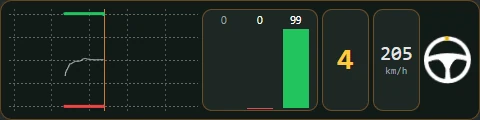
| Component | What it shows |
|---|---|
| Trazas (Traces) | Recent-seconds graph: throttle green, brake red, optional clutch, steering as a thin grey line and ABS activation. |
| Barras (Bars) | Clutch, brake and throttle bars with percentages above. |
| Marcha (Gear) | Current gear. |
| Velocidad (Speed) | Speed with its unit below. |
| Volante (Steering wheel) | A wheel that turns with yours. |
| Indicador ABS (ABS indicator) | Separate ABS activation indicator. Off by default. |
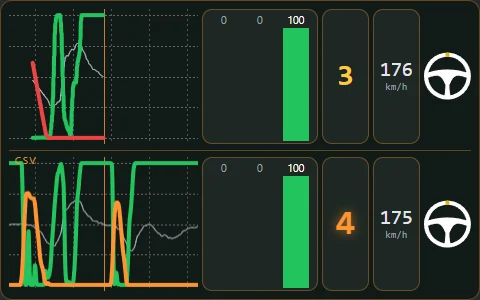
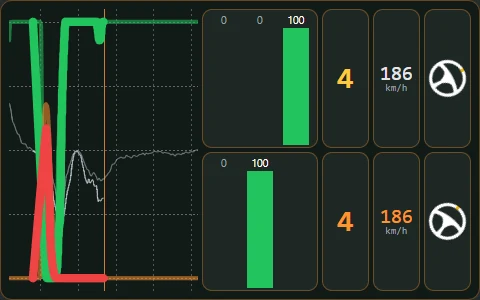
Enabling Ver el CSV debajo with two graphs doubles the running overlay's height. Without a loaded reference lap, the CSV area has no data.
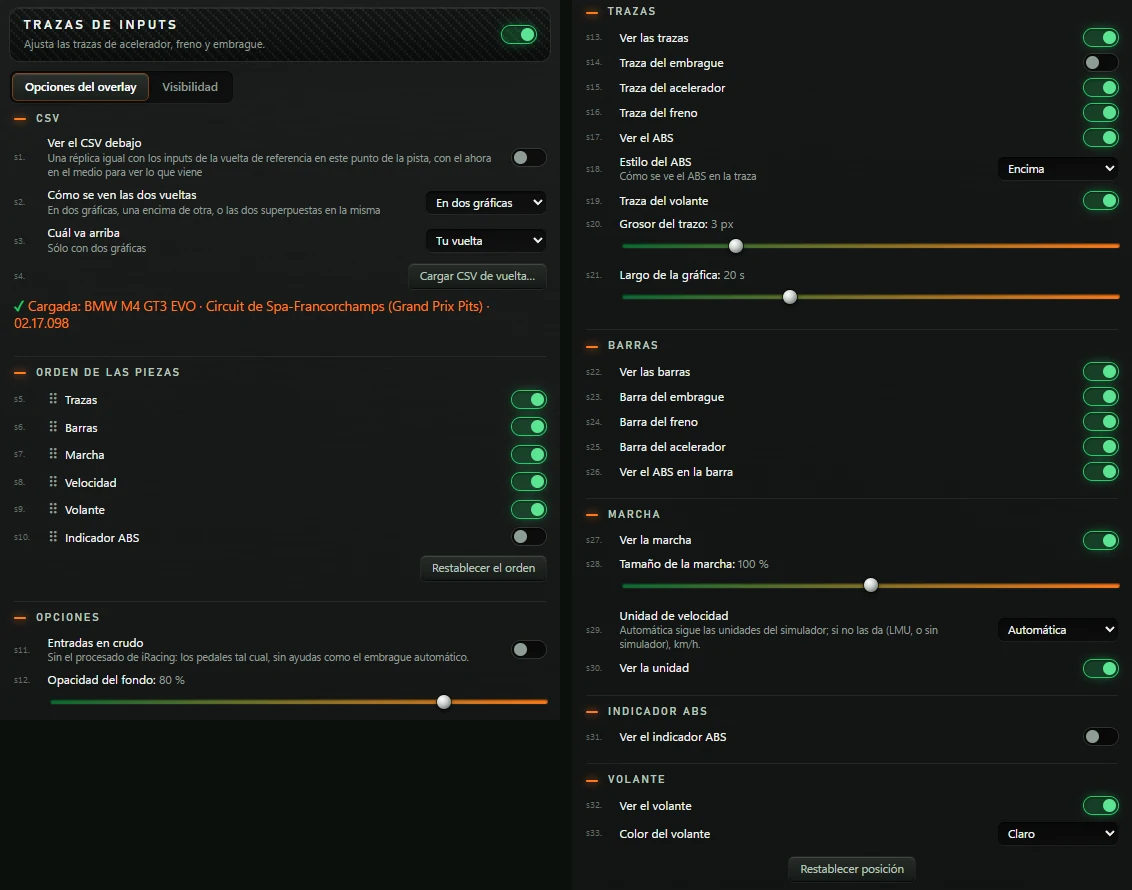
The header reads TRAZAS DE INPUTS (INPUT TRACES). It has two tabs: Opciones del overlay (Overlay options) and Visibilidad (Visibility).
| Option | What it does | Default |
|---|---|---|
| CSV | ||
| Ver el CSV debajo (Show CSV below) | An identical copy showing reference-lap inputs at this track position, with now in the middle to see what comes next. | Off |
| Cómo se ven las dos vueltas (How the two laps are shown) | En dos gráficas (Two graphs) (one above the other), Superpuestas (Overlaid) (both on one graph) or Sólo la referencia (Reference only). | En dos gráficas |
| Cuál va arriba (Which goes on top) | With two graphs only: Tu vuelta (Your lap) or La referencia (The reference). | Tu vuelta |
| Enseñar los mandos (Show controls) | Only in Superpuestas. Disable to show just the two traces without bars, gear or steering wheel. | On |
| Cargar CSV de vuelta… (Load lap CSV…) | Opens a file picker for your reference CSV. Below: «Cargada: coche · circuito · tiempo» (loaded car, track, time) with a green ✓ if car and track match yours, or «Sin vuelta de referencia cargada» (no reference loaded). | — |
| Orden de las piezas (Component order) | ||
| Trazas, Barras, Marcha, Velocidad, Volante, Indicador ABS (traces, bars, gear, speed, steering wheel, ABS indicator) | Each component has a visibility switch. Drag a row by its handle (⠿) to change left-to-right order. | All on except Indicador ABS |
| Restablecer el orden (Reset order) | Restores factory order. | — |
| Opciones (Options) | ||
| Entradas en crudo (Raw inputs) | Pedals without iRacing processing or aids such as automatic clutch. Disabled for Le Mans Ultimate: it supplies just one reading per pedal, already unfiltered, so no alternative is available. | Off |
| Opacidad del fondo | 0 to 100%, in steps of 5. | 80 % |
| Trazas | ||
| Ver las trazas (Show traces) | Shows the graph. | On |
| Traza del embrague (Clutch trace) | Adds the clutch line. | Off |
| Traza del acelerador (Throttle trace) | Throttle line. | On |
| Traza del freno (Brake trace) | Brake line. | On |
| Ver el ABS (Show ABS) | Marks ABS activation in the trace. | On |
| Estilo del ABS (ABS style) | How ABS appears in the trace: Encima (Above) or Relleno (Filled). | Encima |
| Traza del volante (Steering trace) | Steering-angle line. | On |
| Grosor del trazo (Line thickness) | 1 to 10 px. | 3 px |
| Largo de la gráfica (Graph length) | Displayed duration, 5 to 50 s. | 20 s |
| Barras | ||
| Ver las barras (Show bars) | Shows the bars. | On |
| Barra del embrague · Barra del freno · Barra del acelerador (clutch, brake and throttle bars) | Each bar separately. | On |
| Ver el ABS en la barra (Show ABS in the bar) | The brake bar indicates ABS activation. | On |
| Marcha | ||
| Ver la marcha (Show gear) | Shows the gear. | On |
| Tamaño de la marcha (Gear size) | 50 to 150%, in steps of 5. | 100 % |
| Unidad de velocidad (Speed unit) | Automática (Automatic), km/h or mph. Automática follows simulator units; if unavailable (LMU or no simulator), uses km/h. | Automática |
| Ver la unidad (Show unit) | Shows km/h or mph below the speed. | On |
| Indicador ABS | ||
| Ver el indicador ABS (Show ABS indicator) | Shows the ABS component. | Off |
| Volante | ||
| Ver el volante (Show steering wheel) | Shows the steering wheel. | On |
| Color del volante (Steering-wheel colour) | Claro (Light) or Oscuro (Dark). | Claro |
| Restablecer posición | See 2.3. | — |
Visibility by session (all five session types on) and Solo en pista, on by default (see 2.3).
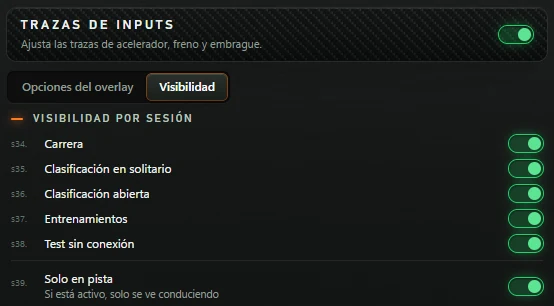
You can also open the INPUTS CSV menu from AJUSTES, La barra, using Abrir el menú de INPUTS CSV (Open INPUTS CSV menu).
The large number is your live delta against the selected reference lap: green and negative when faster, red and positive when slower. Beside it, the trend over the last second: ▼ ganando (▼ gaining), ▲ perdiendo (▲ losing) or steady. You can be ahead (green number) while losing (▲): your advantage is shrinking.
The horizontal bar grows from the centre: left and green for gains, right and red for losses.

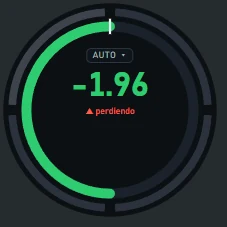

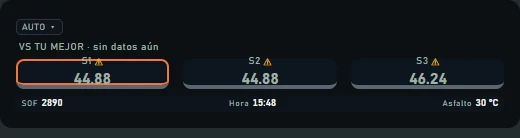
| Element | Meaning | Available appearances |
|---|---|---|
| Selector (AUTO ▾) | Click to choose «CSV», «TU MEJOR» (your best), «MEJOR DE LA SESIÓN» (session best), «TU ÓPTIMA» (your optimal), «TU ÚLTIMA» (your last), «Rival · delante» (ahead), «Rival · detrás» (behind) or «Rival · el primero» (leader). Selection saves like the menu. On a running overlay, unlock overlays first with Ctrl+Alt+L. | All |
| Reference label | The comparison target: «VS TU MEJOR», «VS TU ÚLTIMA», «VS TU ÓPTIMA», «VS MEJOR DE LA SESIÓN», «VS ÓPTIMA DE LA SESIÓN», «VS CSV · time» or «VS rival name · time». Without data: «… · sin datos aún». | Legacy |
| Segments (T1, T2…) | Gain or loss in each track segment this lap. Current segment is marked; a dash means the segment began partway through. | All (arcs around the ring in Círculo) |
| Sector cards (S1, S2…) | Each sector time. Purple for your session best; green, yellow or red according to time lost. ⚠ for an off-track or cut. Current sector has an orange border. Without data: «SECTORES · sin datos». | Legacy |
| Datos sueltos (Additional data) | Data selected in Qué datos. | All (Círculo shows the first three) |
| Siempre / MEJOR DE SIEMPRE (All-time best) | Your best lap in this car at this track, from the engine's memory of previous sessions. | All (if stored data exists) |
| Rival notices | «RIVAL: NO ESTÁ EN PISTA» (rival off track) or «RIVAL name · grabando su vuelta…» (recording lap): no delta until the rival completes a lap with the overlay open. | All |
Two tabs: Sectores (Sectors) and Visibilidad.
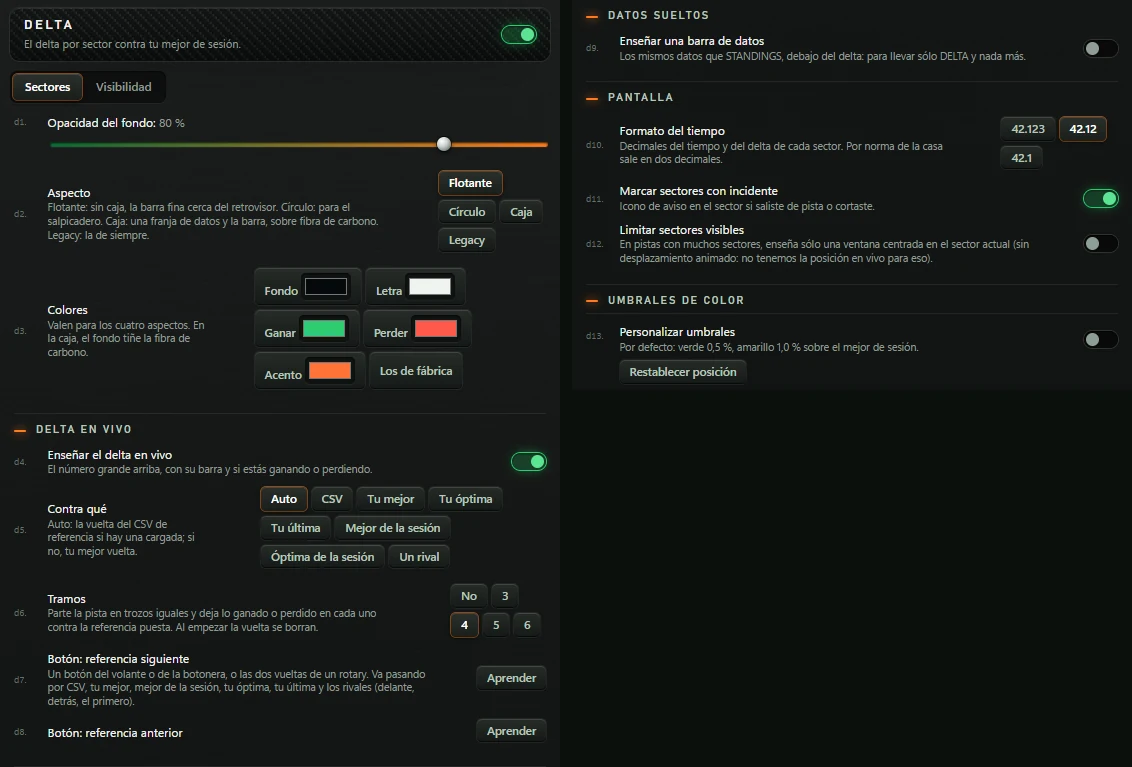
| Option | What it does | Default |
|---|---|---|
| Opacidad del fondo | 0 to 100%, in steps of 5. | 80 % |
| Aspecto (Appearance) | Flotante (Floating): no box, thin bar near the mirror. Círculo (Circle): for the dashboard. Caja (Box): data strip and bar on carbon fibre. Legacy: original appearance. | Flotante |
| Colores (Colours) | Five colour fields: Fondo (Background), Letra (Text), Ganar (Gain), Perder (Loss) and Acento (Accent). Apply to all four appearances; Caja background tints the carbon fibre. Los de fábrica (Factory colours) restores their defaults. | Brand colours |
| Delta en vivo (Live delta) | ||
| Enseñar el delta en vivo (Show live delta) | Large number above, its bar and gain/loss trend. | On |
| Contra qué (Compare against) | Auto (loaded CSV reference lap, or your best lap if none), CSV, Tu mejor (Your best), Tu óptima (Your optimal), Tu última (Your last), Mejor de la sesión (Session best), Óptima de la sesión (Session optimal) or Un rival (A rival). | Auto |
| Qué rival (Which rival) | Only with Un rival: El de delante (Car ahead), El de detrás (Car behind) or El primero de tu clase (Your class leader), or enter a car number (#12). Compares against their last full lap: no delta until they complete one with the overlay open. | El de delante |
| Tramos (Segments) | No, 3, 4, 5 or 6. Splits the track into equal segments and retains each gain/loss against the selected reference. Cleared at the start of each lap. | 4 |
| Botón: referencia siguiente (Button: next reference) | Assign a wheel/button-box button, or both directions of a rotary, to cycle references: CSV, your best, session best, your optimal, your last and rivals (ahead, behind, leader). Click Aprender (Learn); «Aprieta el botón…» appears and you have 10 seconds. Then shows, for example, «Mando 1 · botón 5», plus ✕ to remove it. | No button |
| Botón: referencia anterior (Button: previous reference) | Same, but returns to the previous reference. | No button |
| Datos sueltos | ||
| Enseñar una barra de datos (Show a data bar) | The same data as STANDINGS, below the delta, so you can use DELTA alone. | Off |
| Qué datos (Which data) | Only with the bar enabled. Toggle Sesión (session), SOF, Pilotos (drivers), Tiempo que queda (time left), Vuelta (lap), Puesto en clase (class position), Incidentes (incidents), Reparto de freno (brake bias), Hora (time), Hora en pista (track time), Lluvia (rain), Temp. aire (air temperature), Temp. asfalto (track temperature), Circuito (track), Gasolina (fuel), Última vuelta (last lap) and Mejor vuelta (best lap). | SOF, Hora and Temp. asfalto |
| Pantalla (Screen) | ||
| Formato del tiempo (Time format) | 42.123, 42.12 or 42.1: decimals for each sector's time and delta. Default is two decimal places. | 42.12 |
| Marcar sectores con incidente (Mark sectors with incidents) | Warning icon for off-tracks or cuts in that sector. | On |
| Limitar sectores visibles (Limit visible sectors) | For tracks with many sectors, shows only a window centred on the current sector. | Off |
| Sectores visibles a la vez (Sectors visible at once) | Only with the previous option enabled: 3 to 12. | 5 |
| Umbrales de color (Colour thresholds) | ||
| Personalizar umbrales (Customise thresholds) | Defaults: green 0,5%, yellow 1,0% above session best. | Off |
| Límite verde (Green limit) | Only with Personalizar umbrales: green within this percentage of session best. From 0,1 to 5%. | 0,5 % |
| Límite amarillo (Yellow limit) | Yellow within this percentage of session best; red above it. From 0,1 to 5%. Green never exceeds yellow. | 1,0 % |
| Restablecer posición | See 2.3. | — |
Sector cards, colours, sector-time format and incident warnings only appear in Legacy. Time format also sets the decimals for the large number and segments in every appearance.
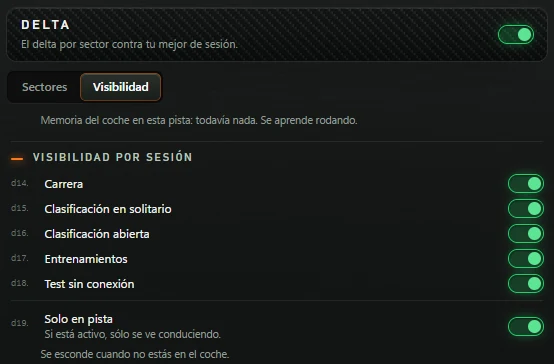
The top note describes the engine's memory for this car and track: «todavía nada. Se aprende rodando.» (nothing yet; learned by driving), or the best lap and lap/session counts. DELTA shows it as the all-time best; sectors compare against this session's best. Below: session visibility (all enabled) and Solo en pista, enabled by default.
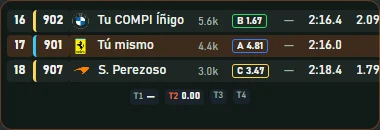
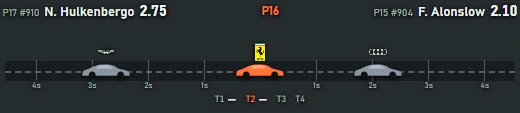
The car ahead, yours and the car behind, with live gaps and their trends. Without a car ahead: «vas primero» (you lead); without one behind: «vas último» (you are last). Without simulator data: «esperando al simulador» (waiting).
| Element | Meaning |
|---|---|
| Rows (Legacy) | Position, class-coloured car number, brand logo, name, iRating, licence, stint (laps since stop, «L»), last lap and, for rivals, current gap, previous-lap gap, change and pace. A car lapping you has a red row; a car you are lapping has a blue row. |
| Pace | Gain or loss per lap, for example «▼0.30/v · 5v». For the car ahead: green when you close in («te acercas… lo pillas en N v»), red when it pulls away. For the car behind: green when you pull away, red when it catches you («te alcanza en N v»). «estable» means almost unchanged. Needs a few seconds of data. |
| Road (Línea) | Your car in the centre, rivals positioned by their time gaps, with second markers. |
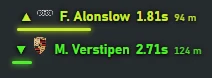
| Aparición (Pop-up) | One row per nearby rival: arrow (▲ ahead, ▼ behind), logo, name and gap in seconds and metres. In edit mode with nobody nearby, shows the sample box «DUELO · aparece a menos de 1.0 s». |
| Segments (T1…) | Time gained or lost to the car ahead in each segment this lap. |
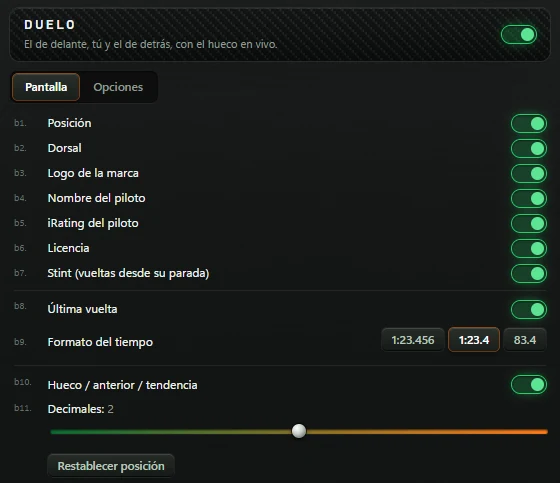
Two tabs: Pantalla and Opciones.
| Option (Pantalla tab) | What it does | Default |
|---|---|---|
| Posición · Dorsal · Logo de la marca · Nombre del piloto · iRating del piloto · Licencia · Stint (vueltas desde su parada): position, car number, brand logo, driver name, iRating, licence and laps since stop. | Each table column separately. | On |
| Última vuelta (Last lap) | Last-lap column. | On |
| Formato del tiempo | Only with Última vuelta enabled: 1:23.456, 1:23.4 or 83.4. | 1:23.4 |
| Hueco / anterior / tendencia (Gap / previous / trend) | Columns for current gap, previous-lap gap, change and pace. | On |
| Decimales (Decimal places) | Only with the previous option enabled: 1 to 3 decimal places for gaps. | 2 |
| Restablecer posición | See 2.3. | — |
These columns only affect Legacy.
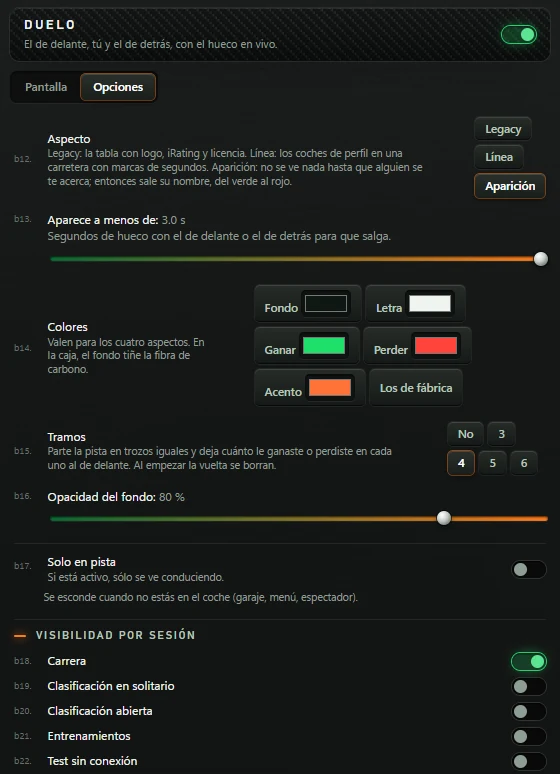
| Option (Opciones tab) | What it does | Default |
|---|---|---|
| Aspecto | Legacy: table with logo, iRating and licence. Línea (Line): side-view cars on a road marked in seconds. Aparición: invisible until someone approaches; their name then appears from green to red. | Legacy |
| Aparece a menos de (Appear below) | Only with Aparición: gap in seconds to the car ahead or behind that triggers display. From 0,3 to 3 s. | 1,0 s |
| Colores | Fondo, Letra, Ganar, Perder and Acento, and Los de fábrica. | Brand colours |
| Tramos | No, 3, 4, 5 or 6. Splits the track into equal segments and retains the gain/loss to the car ahead in each. | 4 |
| Opacidad del fondo | 0 to 100%, in steps of 5. | 80 % |
| Solo en pista | See 2.3. | Off |
| Visibilidad por sesión | See 2.3. | Only Carrera enabled |
Three areas, each with a menu tab: punto ciego (blind spot) (cars alongside), coches más rápidos (faster cars) catching you from behind and a coche lento (slow car) or stopped car ahead. Without engine data: «SIN DATOS DEL MOTOR».
| Element | Meaning |
|---|---|
| Blind spot (Legacy) | A bar on each side when a car is alongside (a square with car count in Simple mode). With early warning, an approaching car appears hollow in both bars until the simulator identifies its side. |
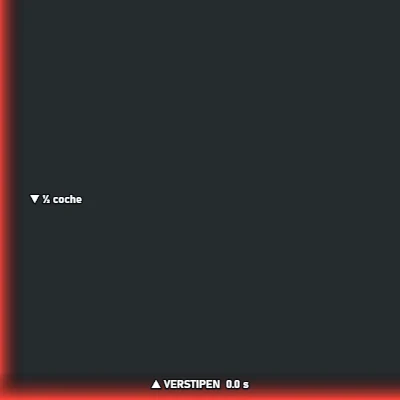
| Overlap | How far the adjacent car overlaps: «morro con morro» (nose to nose), «½ coche» (half a car) or «a la rueda» (at the wheel), with ▲ when ahead and ▼ when behind. |
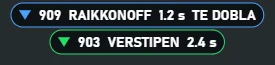
| Approaching-car boxes | One per car catching you: arrow, number, name, time to reach you and, if lapping you, blue «TE DOBLA». |
| Coche lento (Slow car) | A bottom bar fills as the slow car approaches, with distance in metres at centre. Orange for slow, red for stopped, green for off-track. |
| Distance colours | Green far away, then yellow, orange and red in the impact zone or alongside. Blue if lapping you. |
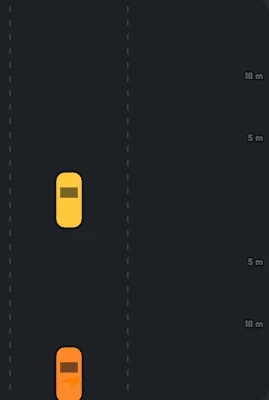
Cenital and Bordes do not use the blind-spot, faster-car and slow-car areas: they draw cars in their own way with distance colouring.
Three tabs: Punto ciego (Blind spot), Coches más rápidos (Faster cars) and Coche lento. Each area has the top switch Activar esta zona (Enable this area), on by default. RADAR has no visibility tab.
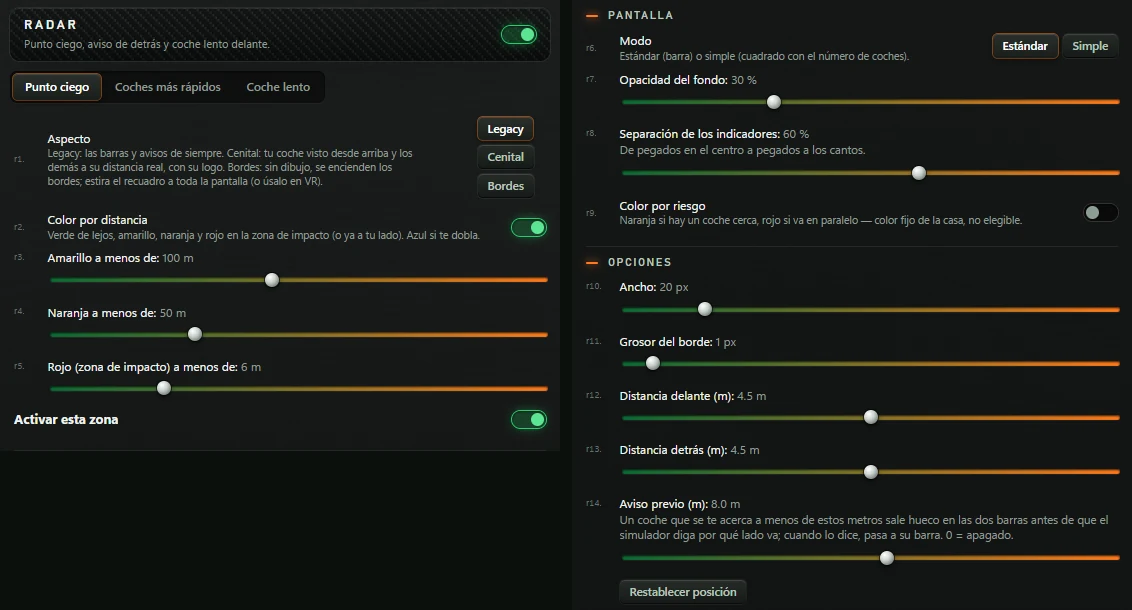
| Option (Punto ciego) | What it does | Default |
|---|---|---|
| Aspecto | Legacy: original bars and warnings. Cenital (Top-down): your car viewed from above, others at real distances with logos. Bordes (Edges): no drawing, edges light up. | Legacy |
| Color por distancia (Colour by distance) | Green far away, then yellow, orange and red in the impact zone or alongside. Blue if lapping you. | On |
| Amarillo a menos de (Yellow below) | 20 to 200 m, in steps of 10. | 100 m |
| Naranja a menos de (Orange below) | 10 to 150 m, in steps of 5. | 50 m |
| Rojo (zona de impacto) a menos de (Red (impact zone) below) | 2 to 20 m. | 6 m |
| Metros que se ven (Visible metres) | Cenital only: distance ahead and behind your car. From 10 to 60 m, in steps of 5. | 15 m |
| Activar esta zona | Turns blind-spot display on or off. | On |
| Modo (Mode) | Estándar (Standard) (bar) or Simple (square with car count). | Estándar |
| Opacidad del fondo | 0 to 100%. | 30 % |
| Separación de los indicadores (Indicator spacing) | From together at centre (0%) to flush with the edges (100%). | 60 % |
| Color por riesgo (Colour by risk) | Orange for a nearby car, red when alongside. Fixed colours, not selectable. | Off |
| Ancho (Width) | Estándar mode: bar width, 5 to 100 px. | 20 px |
| Grosor del borde (Border thickness) | Estándar mode: 0 to 20 px. | 1 px |
| Distancia delante (m) · Distancia detrás (m) (front/rear distance) | Estándar mode: 3 to 6 m, in steps of 0,1. | 4,5 m |
| Aviso previo (m) (Early warning (m)) | Estándar mode: approaching cars within this distance appear hollow in both bars until the simulator identifies their side, then move to that bar. From 0 to 15 m; 0 disables it. | 8,0 m |
| Tamaño (Size) | Simple mode (Modo simple section): square size, 20 to 120 px. | 44 px |
| Posición vertical (Vertical position) | Simple mode: 0 to 100%. | 50 % |
| Enseñar el número de coches (Show car count) | Simple mode: count inside the square. | On |
| Restablecer posición | See 2.3. | — |
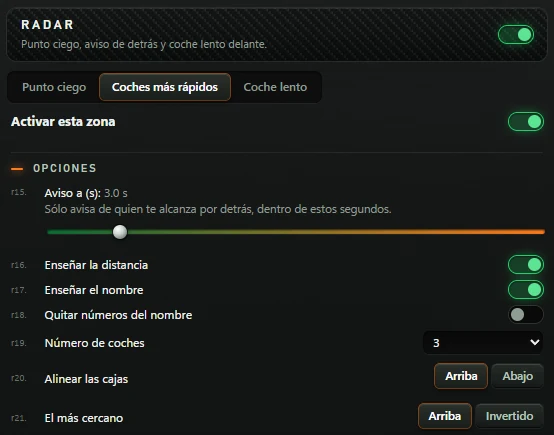
| Option (Coches más rápidos) | What it does | Default |
|---|---|---|
| Activar esta zona | Turns the approaching-car warning on or off. | On |
| Aviso a (s) (Warn at (s)) | Only warns for cars catching you from behind within this time. From 0,3 to 20 s. | 3,0 s |
| Enseñar la distancia (Show distance) | Seconds in each box. | On |
| Enseñar el nombre (Show name) | Name in each box. | On |
| Quitar números del nombre (Remove numbers from name) | Only with names enabled. | Off |
| Número de coches (Number of cars) | List from 1 to 10: maximum box count. | 3 |
| Alinear las cajas (Align boxes) | Arriba (Top) or Abajo (Bottom). | Arriba |
| El más cercano (Closest car) | Arriba or Invertido (Reversed). | Arriba |
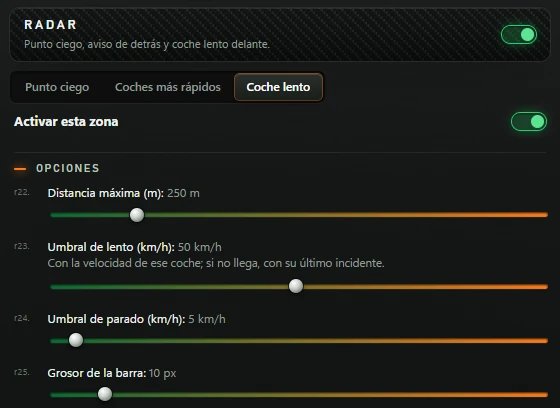
| Option (Coche lento) | What it does | Default |
|---|---|---|
| Activar esta zona | Turns the slow-car warning on or off. | On |
| Distancia máxima (m) (Maximum distance (m)) | How far ahead it looks. From 100 to 999 m. | 250 m |
| Umbral de lento (km/h) (Slow threshold (km/h)) | Below this speed counts as slow. Uses the car's speed; if unavailable, its latest incident. From 1 to 100. | 50 km/h |
| Umbral de parado (km/h) (Stopped threshold (km/h)) | Below this, the bar is red. From 1 to 100. | 5 km/h |
| Grosor de la barra (Bar thickness) | 0 to 100 px; 0 removes it. | 10 px |
Shows the current flag and name. Without a flag, the overlay is hidden unless Estado sin bandera is enabled: then grey «SIN BANDERA» (or «sin conexión» without data).
Supported flags: DESCALIFICADO (disqualified), ROJA (red), NEGRA (black), DAÑO (damage), DAÑO LEVE (minor damage), AVISO DEL JUEZ (steward warning), AMARILLA AGITADA (waving yellow), AMARILLA (yellow), AZUL (blue), RESTOS EN PISTA (debris), ÚLTIMA VUELTA (last lap), BANDERA A CUADROS (chequered), QUEDAN 5 VUELTAS (5 laps left), QUEDAN 10 VUELTAS (10 laps left), VERDE EN 1 VUELTA (green in 1 lap) and VERDE (green). Damage flags use a disc, waving yellow uses chevrons and chequered uses checks. Only red and orange flags flash when the simulator marks them urgent.
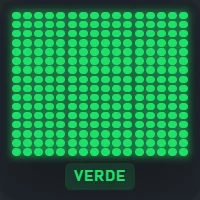
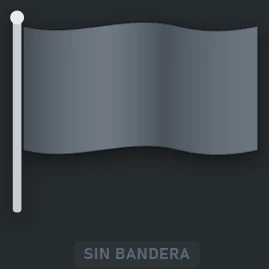
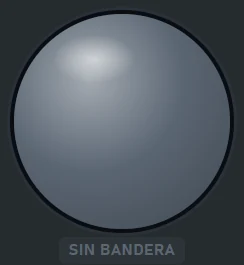
Two tabs: Opciones and Visibilidad.
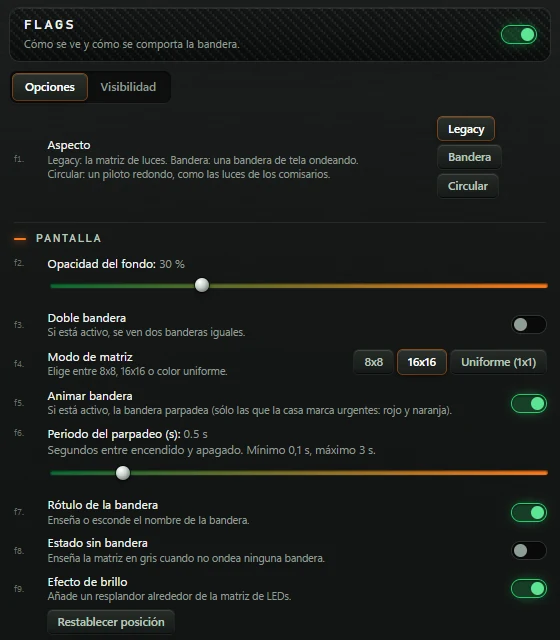
| Option | What it does | Default |
|---|---|---|
| Aspecto | Legacy: light matrix. Bandera (Flag): waving fabric flag. Circular: round indicator like marshal lights. | Legacy |
| Opacidad del fondo | 0 to 100%. | 30 % |
| Doble bandera (Double flag) | Shows two identical flags when enabled. | Off |
| Modo de matriz (Matrix mode) | 8x8, 16x16 or Uniforme (1x1) (Uniform (1x1)), a single colour. Legacy only. | 16x16 |
| Animar bandera (Animate flag) | Enables flashing only for flags marked urgent by the app: red and orange. | On |
| Periodo del parpadeo (s) (Flash period (s)) | Seconds between on and off. Minimum 0,1 s, maximum 3 s. | 0,5 s |
| Rótulo de la bandera (Flag label) | Shows or hides the flag name. | On |
| Estado sin bandera (No-flag state) | Shows the matrix grey when no flag is active. | Off |
| Efecto de brillo (Glow effect) | Adds a glow around LEDs. Legacy only. | On |
| Restablecer posición | See 2.3. | — |
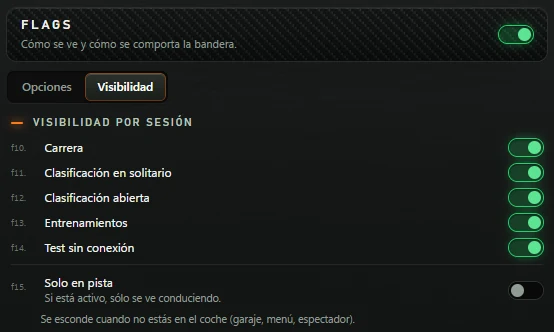
Visibilidad tab: all five session types enabled and Solo en pista disabled.
Circuit layout with a numbered circle for each car. Yours is larger and amber. Corner names can appear as you pass through them.
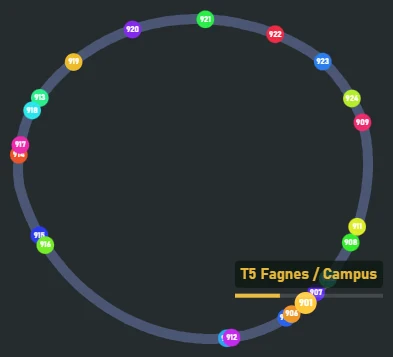
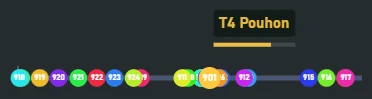
Header: «Map · Configura cómo se ve el mapa del circuito.» (configure the circuit map). Six tabs: Trazado (Track layout), Colores, Coches (Cars), Curvas (Corners), Estilo (Style) and Visibilidad.
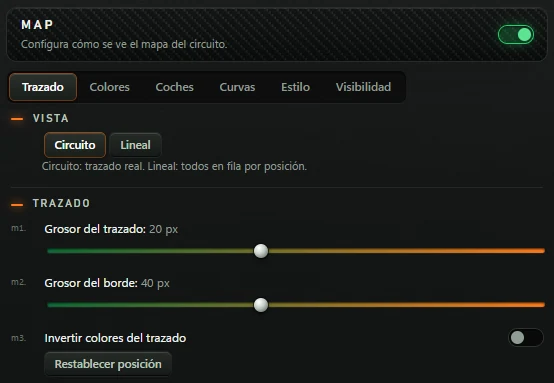
| Option (Trazado) | What it does | Default |
|---|---|---|
| Vista (View) | Circuito (Circuit): actual layout. Lineal (Linear): all cars in position order. | Circuito |
| Grosor del trazado (Track thickness) | 5 to 40 px. | 20 px |
| Grosor del borde | 10 to 80 px, in steps of 2. | 40 px |
| Invertir colores del trazado (Invert track colours) | Swaps track and border colours. | Off |
| Restablecer posición | See 2.3. | — |
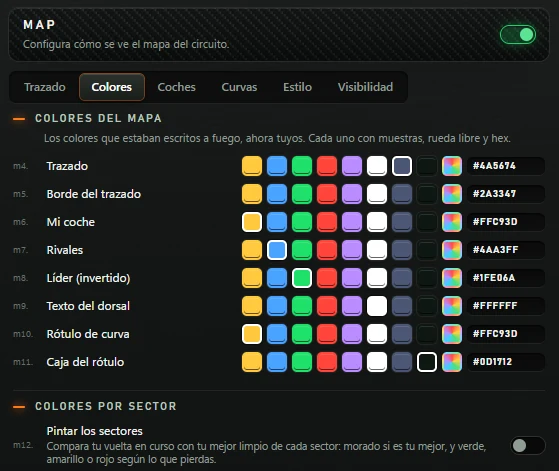
| Option (Colores) | What it does |
|---|---|
| Trazado · Borde del trazado · Mi coche · Rivales · Líder (invertido) · Texto del dorsal · Rótulo de curva · Caja del rótulo: track, track border, own car, rivals, inverted leader, car-number text, corner label and label box. | Choose each colour using eight swatches (Ámbar, Azul, Verde, Rojo, Morado, Blanco, Gris, Negro: amber, blue, green, red, purple, white, grey, black), the colour wheel or a code such as #ffc93d. Defaults: grey track, dark-grey border, amber own car, blue rivals, green leader, white number, amber corner label and black box. |
| Pintar los sectores (Colour sectors) | Compares the current lap with your best clean time in each sector: purple for your best, green/yellow/red according to time lost. Off by default. |
| Morado: mi mejor · Verde: en ritmo · Amarillo: cerca · Rojo: lejos (purple: my best; green: on pace; yellow: close; red: far) | Only with Pintar los sectores: colour for each case. |
| Verde hasta (Green up to) | Allowed percentage above your best. From 0,1 to 5%; default 1,0%. |
| Amarillo hasta (Yellow up to) | 0,5 to 15%, in steps of 0,5; default 3,0%. Red above this. |
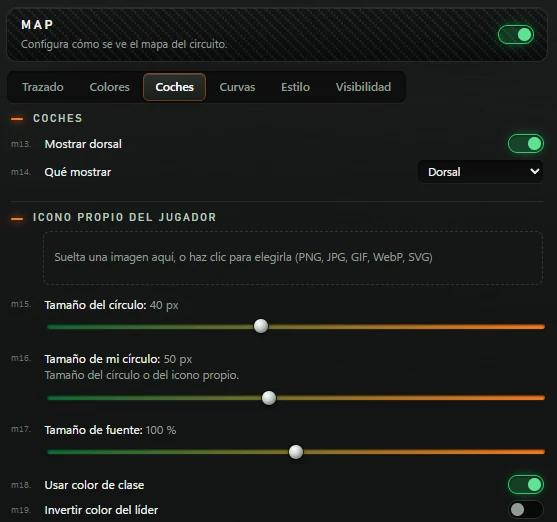
| Option (Coches) | What it does | Default |
|---|---|---|
| Mostrar dorsal (Show car number) | A number inside each circle. | On |
| Qué mostrar (What to show) | Only with Mostrar dorsal: Dorsal (Car number), Posición de sesión (Session position), Posición de clase (Class position) or Posición en vivo (Live position). | Dorsal |
| Icono propio del jugador (Custom player icon) | Drop an image into the box, or click to select it (PNG, JPG, GIF, WebP, SVG). Your car uses that image. Once set, a small preview and button appear: Quitar icono (Remove icon), asking «¿Quitar el icono?» (remove icon?) with Sí, quitar (Yes, remove) and Cancelar (Cancel). A non-image file triggers «Eso no es una imagen.» (that is not an image). | No icon |
| Tamaño del círculo (Circle size) | Rivals: 10 to 80 px, in steps of 2. | 40 px |
| Tamaño de mi círculo (My circle size) | Size of your circle or custom icon. From 10 to 100 px. | 50 px |
| Tamaño de fuente (Font size) | Car numbers: 50 to 150%. | 100 % |
| Usar color de clase (Use class colour) | Each car uses its class colour. | On |
| Invertir color del líder (Invert leader colour) | The leader uses Líder (invertido) colour. | Off |
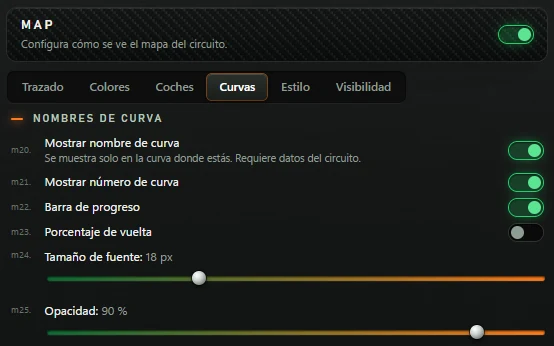
| Option (Curvas) | What it does | Default |
|---|---|---|
| Mostrar nombre de curva (Show corner name) | Only shown in the current corner. Requires circuit data. | On |
| Mostrar número de curva (Show corner number) | Number before the name, for example T5. | On |
| Barra de progreso (Progress bar) | A bar below the name tracks progress through the corner. | On |
| Porcentaje de vuelta (Lap percentage) | Lap percentage below the name. | Off |
| Tamaño de fuente | 12 to 32 px. | 18 px |
| Opacidad (Opacity) | 20 to 100%, in steps of 5. | 90 % |
Options below Mostrar nombre de curva only appear while it is enabled.
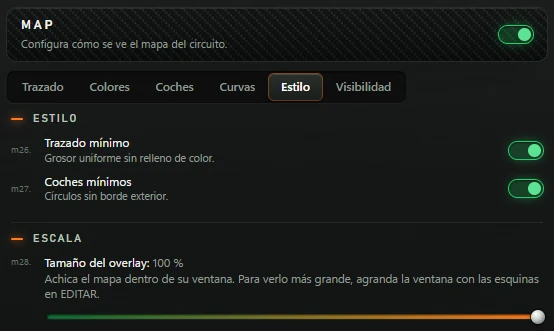
| Option (Estilo) | What it does | Default |
|---|---|---|
| Trazado mínimo (Minimal track) | Uniform thickness without colour fill. | On |
| Coches mínimos (Minimal cars) | Circles without an outer border. | On |
| Tamaño del overlay | Shrinks the map within its window, from 50 to 100%. To enlarge it, resize the window using the EDITAR corner handles. | 100 % |
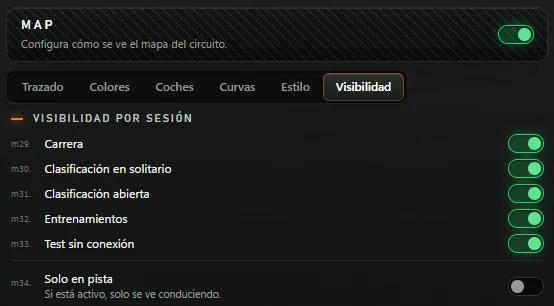
Visibilidad tab: all five session types enabled and Solo en pista disabled.
If you cannot find it, click Restablecer posición in its menu to return it to the screen centre.
Check in order: green menu-header switch (off hides the drawing); session visibility and Solo en pista; chosen display. FLAGS stays hidden without a flag unless Estado sin bandera is on. DUELO Aparición stays hidden until somebody approaches. If still missing, click Restablecer posición.
Overlays need the engine and an active licence. In AJUSTES, Perfil de piloto, click Comprobar licencia.
It is locked so clicks reach the simulator. Unlock with Ctrl+Alt+L, use the controls, then lock again with Ctrl+Alt+L.
It is editing or unlocked. Press F6 to leave edit mode or Ctrl+Alt+L to lock.
No comparison lap yet: complete a lap, or load a CSV if using CSV comparison.
The rival is not in your class standings, or the entered number does not exist. Choose another.
Normal: you are ahead of the reference but lost time in the last second.
No reference lap loaded. Click Cargar CSV de vuelta…. Without a green ✓, the car or track does not match yours.
Unavailable with Le Mans Ultimate: it already provides just one unfiltered reading per pedal.
The engine does not know the track yet. Keep driving: progress rises until it draws the layout.
Enable Mostrar nombre de curva. Names only appear in the current corner and with data for that circuit.
The engine is not sending data. Check the simulator is running and the engine is on (bar indicator).
Check it is a transparent overlay in TOOLKIT and that you clicked AÑADIR A OVERLAYS. It appears next time Push & Lift opens: close Push & Lift with the red bar X and reopen it.