 PUSH & LIFT
PUSH & LIFT
PUSH & LIFT
OVERLAYS
Who's alongside, who's catching you from behind and which slow car is ahead.
RADAR puts three warnings in a single overlay: the blind spot on each side, the cars catching you from behind, and the slow or stopped car ahead. With no traffic nearby it draws nothing, and each of the three warnings can be switched on or off separately.
Several overlays work with your reference-lap CSV.
Like everything in the suite, the AI can read and use them.
If you race with PLIA as your spotter, it understands what your overlays show and tells you.
A bar on each side with a marker that moves with the real distance of the car next to you.
If someone is closing in fast and the side isn't known yet, both bars light up as outlines.
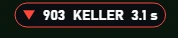
Cars gaining on you from behind, three by default, with number, surname and seconds. A car running your pace doesn't trigger it.
A bar with the metres left to it: orange if it's slow, red if it's stopped and green if it has gone off the track.
The team and other drivers answer there. You can also email us at [email protected].
 DELTA
DELTA DUELO
DUELO FLAGS
FLAGS MAP
MAP INPUTS CSV