 PUSH & LIFT
PUSH & LIFT
PUSH & LIFT
BLACK BOX
The whole race in one table, class by class, with your row always in sight.
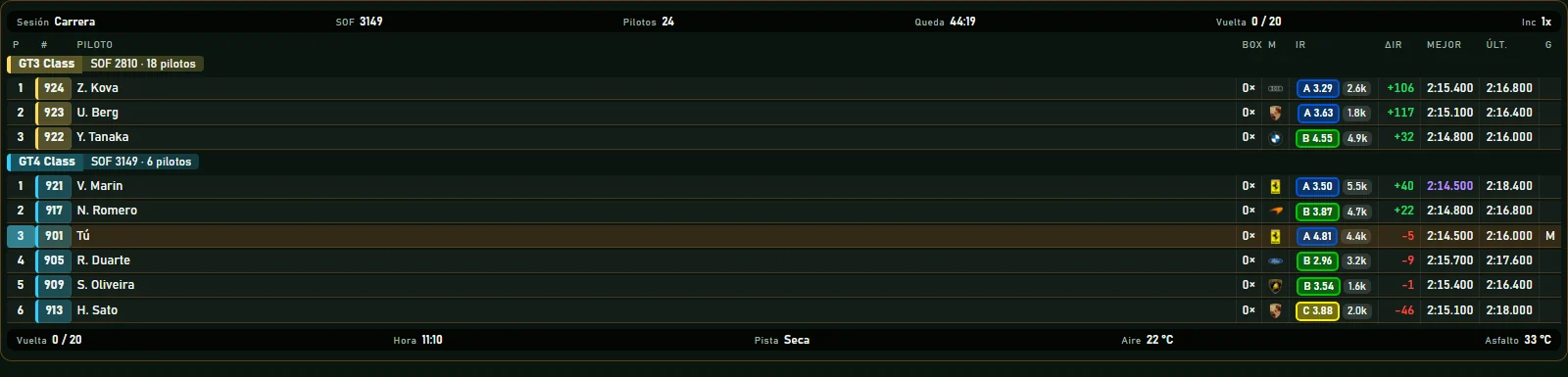
STANDINGS is the live session classification, grouped by class. Each row gives you position, number, licence and iRating, pit stops and lap times, and in a race it works out how much iRating you'd win or lose if it ended now. You choose which columns you see and in what order.
The usual information, in the colours you want.
Data you don't usually get, so you don't have to jump from screen to screen.
PLIA can read what they show while you drive.
Each class gets its own header with driver count and SOF, and the fastest lap in each class shows in purple.
In a race, one column estimates how much iRating you gain or lose from your current position.
How many stops each car has made and how long the last one took, who's in the pits and who's talking on the radio.
While watching a replay or spectating, click a row and the iRacing camera jumps to that car.
Drag them to reorder, resize them, and pick what goes in the header and the footer.
The team and other drivers answer there. You can also email us at [email protected].
 RELATIVE
 CLIMA
CLIMA FUEL
FUEL LAPS
LAPS