Push & Lift is a real-time telemetry reader: it compares what you are doing
with a reference lap — a Garage 61 CSV or one you record yourself — and turns the
difference into lights, colours and numbers you can read at 250 km/h.
This page explains every one of them.
01 · THE COUNTDOWN
Five lights to the braking point.
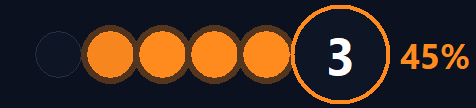
The five dots light up 3 seconds before the reference driver brakes and go out
left to right. The last one dies exactly at their braking point. The big LED
counts 3 · 2 · 1 · BRAKE. You never look for a board or a cone again — you
listen to the lights with the corner of your eye.
The colour arrives before the corner and tells you how hard the stop is,
so you know what's coming even on a track you've never seen:
LIFTblue · no brake, just lift
<10%green · a brush of brake
10–25%yellow · light braking
25–60%orange · proper braking
>60%red · big stop
Next to the LED you also get the expected peak brake % of the corner —
that's the target for your foot.
02 · INSIDE THE BRAKING ZONE
Live correction, then the verdict.
While you brake, the LED compares your pedal with the reference in real time:
flashing red = you're braking too little ·
blue = you're overdoing it. Steady colour means you're on it.
When you release, the & of the logo keeps the verdict until the next corner:
green = nailed ·
red = braked short ·
blue = over-braked.
Lap after lap, that's your homework list — corner by corner.
03 · THE TELEMETRY TRACES
Your lap against theirs, live.
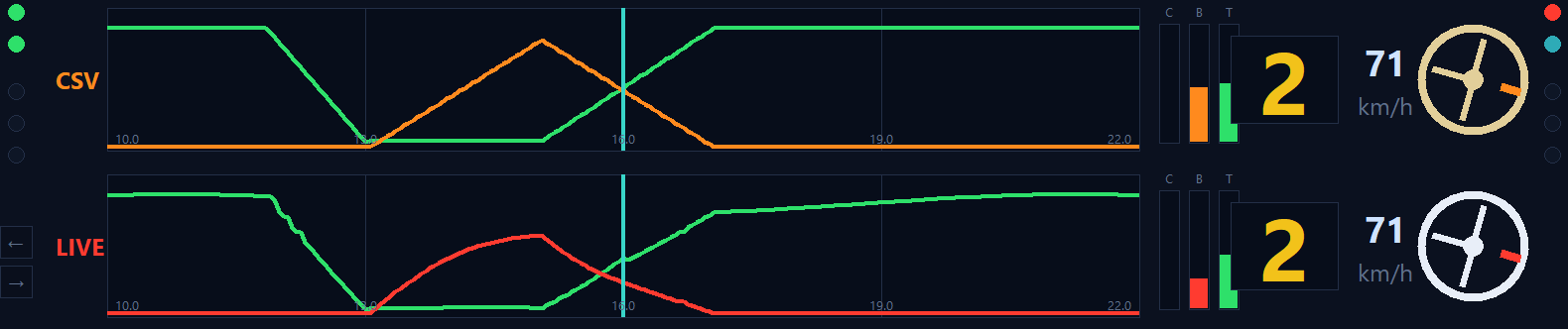
Two rows, same stretch of track (±6 % around you, the cyan line is your position).
Top: the reference lap (gold steering wheel). Bottom: you (white wheel).
Green = throttle, red/orange = brake. Each row also shows clutch/brake/throttle bars,
gear, speed and the steering wheel with its real rotation.
How a driver uses it: glance after the corner. If their green rises earlier than yours,
you're late on throttle. If their brake trace is shorter and deeper, they brake later and
harder. One look, one fix at a time.
04 · THE SIDE SCREENS
Race data that answers questions.
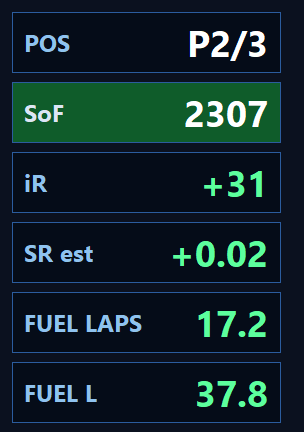
POS — your live position. The background flashes green when your last lap was faster than the previous one, red when slower.
SoF — strength of field. Its background is the flag: green, yellow (blinking), chequered…
iR — the iRating you are gaining or losing right now, from the live standings.
SR est — estimated Safety Rating change of this race, from your incidents and laps.
FUEL LAPS / FUEL L — fuel in laps left and in litres. Green you make it · yellow save a little · red you don't. Set your stint length in the menu for endurance.
TRK / AIR — track and ambient temperature, straight from iRacing's live data feed. No more tabbing out to check conditions.
05 · TYRES & TRACTION
Temperatures and grip, one glance.
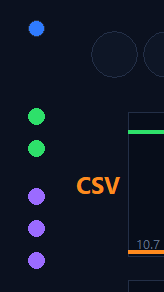
🌡️ Two LEDs per side, real car sides (left column = left tyres). Blue blinking = dangerously cold · green = in the window · red = overheating. The first out-lap suddenly makes sense.
Purple LEDs — a 3-step meter you assign with the orange side buttons: SLP predictive traction (1-2 = about to slide, 3 blinking = losing traction), TC traction control working, or ABS active.
06 · THE RACE BAR
Who matters, and whether you're winning them.
Four cells, always on. TRACK (left): the cars physically around you — any class,
lapped traffic included. That's who you're about to catch or be caught by.
CLASS (right): your real race — the rival of your class ahead and behind by actual
progress. Endurance without noise.
Each cell: gap in seconds, car number and driver name. The background is the trend:
green you're gaining ground · red you're losing it.
No maths at 200 km/h — just colour.
07 · YOUR REFERENCE LAP
Feed it a lap. Any lap.
Two ways: download any driver's lap from Garage 61 as CSV and load it from the
right-click menu, or press ● REC and record your own best lap — the app exports it
in the same format. Push & Lift reads the file, checks it's the right track
(REF ✓ in the header, a warning if it isn't) and resamples it into the coach you've
just read about.
Pro tip: don't chase the world record. Pick a lap 1–2 seconds faster than yours —
close enough to copy, far enough to learn from. When you match it, upgrade the reference.
The engine behind all of this is called CSV·DDU —
see how it works and why we built it.
08 · MAKE IT YOURS
Any rig. Your rules.
Single screen, triples or VR (with its own mode for OpenKneeboard and similar).
Drag it anywhere, resize from the corner, set the opacity, and hide any module you
don't want from the right-click menu — countdown only? full DDU? your call.
Menus and messages in six languages, switchable any time.
A dedicated row — pinned top or bottom — turns the countdown's verdict into a full
technical readout. Left half, LAP: lap number, last lap time and delta against
your previous lap — green improved,
red slower, purple your best
lap of the session. Right half: the analysis of the corner you just left — the
measurement window also covers the 100 m after the corner, so it grades the exit,
not just the braking.
BRAKE ±m EARLY / LATE — your braking point against the reference's, in metres.
PRESS ±% SOFT / HARD — your peak brake pressure against the reference's.
Δ ±s — time gained or lost in that specific corner.
Toggle it and set its position from the right-click menu.